8 Best Deep Freezer Thermometers and Alarms (November 2026)
The best deep freezer thermometers and alarms include the GoveeLife WiFi Thermometer with Alarm for households away often, the MOCREO Wi-Fi Freezer Alarm with 2 Sensors for tracking temperature changes, and the AcuRite Wireless Fridge and Freezer Thermometer for checking both appliances.
On this page (14 sections)
- The best deep freezer thermometers for different households
- Compare alarm coverage before extra features
- How to choose a deep freezer thermometer with enough range
- Wi-Fi, local wireless or a dial: match your routine
- Place the sensor near food without burying it
- Set up alerts before relying on them
- Set limits around normal operation, not the sensor's extremes
- Understand what survives a power or internet outage
- Check the installed radio link with the lid closed
- Read temperature changes without jumping to conclusions
- Keep thermometers readable and maintained
- Avoid the mistakes that hide a freezer problem
- Is an alarm worth it for a garage freezer?
- Which deep freezer thermometer should you buy?
The GoveeLife set is the best deep freezer thermometer for households that want phone alerts plus a local buzzer. Choose MOCREO for exportable temperature records, AcuRite for a separate household display, or Taylor analog for a battery-free check.
The right choice depends on how you'll notice trouble. A dial helps when you're standing at the freezer; an alarm matters when you're upstairs, asleep or away.
A thermometer measures conditions inside the cabinet, while the freezer's control dial sets cooling. Even a freezer with numbered controls benefits from a separate reading.
Our picks at a glance
-
1
 Best for households away often
GoveeLife WiFi Thermometer with Alarm, 2-Pack
8.9/10 our score
See it on Amazon -
2
 Best for tracking temperature changes
MOCREO Wi-Fi Freezer Alarm with 2 Sensors
8.7/10 our score
See it on Amazon -
3
 Best for checking both appliances
AcuRite Wireless Fridge and Freezer Thermometer
8.3/10 our score
See it on Amazon
- 4
 Check it
Taylor Analog Fridge and Freezer Thermometer
Best for daily visual checks - 5
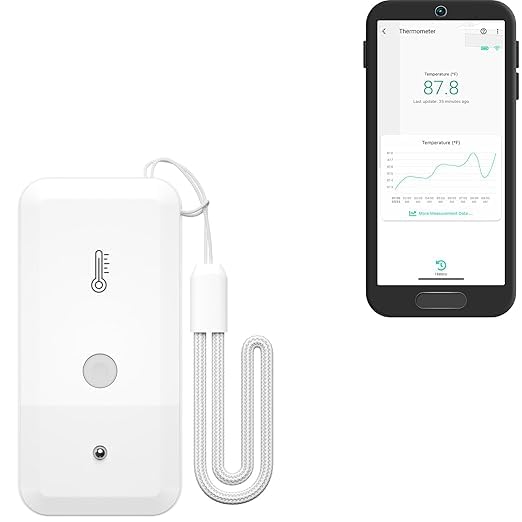 Check it
YoLink Freezer Temperature Sensor, YS8017
Best for distant garage freezers - 6
 Check it
Taylor Digital Fridge and Freezer Thermometer
Best for reviewing overnight changes - 7
 Check it
PECULA Fridge and Freezer Thermometer, 2 Pack
Best for checking multiple spots - 8
 Check it
Rubbermaid Commercial Fridge and Freezer Thermometer
Best for busy shared kitchens
The best deep freezer thermometers for different households
Choose GoveeLife for remote warnings, MOCREO for records, and AcuRite for a screen you can read at home. The analog options suit regular visual checks, while YoLink needs extra attention to hub requirements and its lower measurement limit.
Scores reflect alert coverage, measurement range and how each design fits freezer use. A simpler dial can still be the right choice if you don't need notifications.
GoveeLife WiFi Thermometer with Alarm, 2-Pack: Best for households away often
- Gateway and 2 sensors
- App, email and local buzzer alerts
- Magnetic or hanging placement
- Probe holders included
Choose this set when you want remote warnings plus an alarm near the freezer. GoveeLife says the battery-powered sensor can sound during a network disconnection.
Pros
- Phone and email notifications
- Battery-powered local alarm
- Gateway supports up to 10 sensors
Cons
- Requires 2.4 GHz Wi-Fi
- Buzzer starts muted and needs local silencing
GoveeLife suits a household that leaves home regularly but wants someone nearby to hear a warning too. Its gateway and 2 sensors can cover a fridge and freezer, with app notifications, email and an 80 dB sensor buzzer.
The measurement range extends well below normal freezer settings, and GoveeLife specifies accuracy of ±0.9 F. Its flat probe cable, holder and magnetic or hanging placement give you several ways to keep the sensing point secure.
The useful distinction is the local alarm: GoveeLife says the battery-powered sensor can still sound if the network disconnects. That doesn't mean phone notifications continue without an internet connection.
Enable the buzzer during setup because it starts muted, and remember that silencing an active buzzer requires pressing the side button. Skip this set if you want a separate temperature screen or cannot provide 2.4 GHz Wi-Fi near the gateway.
MOCREO Wi-Fi Freezer Alarm with 2 Sensors: Best for tracking temperature changes
- Hub and 2 sensors
- CSV data export
- App control for hub mute
- Probe clips and cable organizers
Choose MOCREO if you want temperature graphs and records you can export. The hub alarm can be dismissed through the app.
Pros
- 2 years of data export without a subscription
- Hub-offline and low-battery alerts
- Hub supports up to 30 compatible sensors
Cons
- Requires 2.4 GHz Wi-Fi
- Hub must be positioned for a useful local alarm
MOCREO suits someone who wants to understand a temperature pattern rather than see only the current number. Its graphs and 2 years of CSV export without a subscription help you keep records before and after changing freezer settings.
The kit includes a hub and 2 sensors, with push notifications, email and a 90 dB hub alarm. You can mute the hub from the app, which is useful when another household member is already handling the freezer.
MOCREO specifies ±0.9 F accuracy and uses a 0.9 mm flat probe cable. Magnetic mounting, a mounting plate and cable clips help keep the sensor body and wiring out of the way.
Choose it for several appliances or a growing monitoring setup, since the hub supports up to 30 compatible sensors. Skip it if you only want a quick dial check, or if graphs and export files would add work you won't use.
AcuRite Wireless Fridge and Freezer Thermometer: Best for checking both appliances
- 2 sensors and a separate LCD
- Audible and visual alarms
- High and low records
- Counter, wall or magnetic display mounting
Choose AcuRite for a household display that shows fridge and freezer readings together. Its programmable alarms suit someone who can hear the display at home.
Pros
- Separate readings for 2 appliances
- High and low records for each sensor
- Several display mounting options
Cons
- Confirm temperature and wireless ranges
- Requires 7 AA batteries, not included
AcuRite suits someone who wants to see fridge and freezer temperatures together without reaching for a phone. Its separate display shows both readings, records each compartment's high and low, and gives programmable audible and visual warnings.
Place the display where you spend time, rather than beside a freezer you rarely visit. Its magnets, wall opening and foldout stand let you choose a visible spot without dedicating counter space.
The sensors attach with silicone straps or suction cups. The full set needs 7 AA batteries, which aren't included, and AcuRite recommends lithium batteries in sensors used below -4 F.
Confirm the operating range and wireless reach before choosing it for a distant garage or unusually cold freezer. Skip AcuRite if you need notifications away from home: its useful warning point is the household display, so its location matters as much as sensor placement.
Taylor Analog Fridge and Freezer Thermometer: Best for daily visual checks
- 3-inch analog dial
- Printed temperature zones
- Stainless steel casing
- Hangs or stands
Choose Taylor analog when you want a large dial and no battery upkeep. It suits a freezer you already open and check regularly.
Pros
- Large dial with labeled zones
- No batteries or pairing
- Taylor identifies it as NSF certified
Cons
- Requires opening the freezer to read
- No alarm or temperature history
Taylor analog suits someone who already checks the freezer regularly and wants fewer things to maintain. Its 3-inch dial has labeled freezer, refrigerator and danger zones, with no app, batteries or pairing.
The stainless steel casing hangs from a rack or stands on a surface. Its Fahrenheit range reaches -20 F, giving it more room below a normal freezer target than the two models here that stop at -4 F.
Taylor identifies this thermometer as NSF certified and backs it with a 1-year limited warranty. Hand wash it and keep it out of the dishwasher.
Buy it for a clear daily reading or as a simple companion to an electronic monitor. Skip it if you expect a warning between visits, and place it where packages won't hide the face or knock it over when you reach for food.
YoLink Freezer Temperature Sensor, YS8017: Best for distant garage freezers
- LoRa sensor-to-hub connection
- Text, email and push alerts
- Low-battery notifications
- 2 AA batteries included
Consider YoLink when distance makes a conventional wireless link awkward. This sensor needs a separate YoLink hub and has limited measurement headroom below a normal freezer target.
Pros
- Long-range sensor radio
- Custom temperature thresholds
- IFTTT and Alexa temperature queries
Cons
- Hub is not included
- Lower measurement limit is -4 F
- Text notifications have a monthly allowance
YoLink suits a distant freezer where the sensor-to-hub radio link is the main obstacle. It uses LoRa rather than connecting the sensor directly to Wi-Fi, with an advertised open-air reach of up to 2,034 feet.
Walls, distance and the freezer cabinet still affect the link, so that figure isn't a promise for a detached garage. The app needs a functioning YoLink hub, and this sensor pack does not include one.
Its -4 F lower measurement limit deserves equal attention. Choose a wider-range model if you intentionally run the freezer colder or need to see cold-cycle dips below that point.
YoLink offers push, email and limited text alerts, plus low-battery warnings. The included AA batteries have a claimed life of up to 5 years depending on conditions; Alexa supports temperature queries, but this sensor doesn't trigger Alexa routines.
Taylor Digital Fridge and Freezer Thermometer: Best for reviewing overnight changes
- 2-inch LCD
- Current, minimum and maximum readings
- Battery-level display
- Clip or removable suction cup
Choose this digital model to check the highest and lowest readings between visits. Its limited range below zero makes it less suitable for colder freezer settings.
Pros
- Records temperature extremes
- Shows Fahrenheit and Celsius
- CR2032 battery included
Cons
- Alarm operation is not established
- No remote notifications
- Lower measurement limit is -4 F
Taylor digital suits someone who checks in person but wants a record of the highest and lowest readings between visits. Its 2-inch LCD also shows the current temperature and battery level.
The clip and removable suction cup help position the face where you can read it quickly. A CR2032 battery comes included, and the display supports Fahrenheit and Celsius.
Its range bottoms out at -4 F, so choose another model if your freezer runs below that. A display at its lower limit cannot show how much colder the cabinet becomes.
Don't choose this model for alarm coverage because its alarm controls and behavior aren't established. Min/max memory can reveal a change after the fact, but it won't tell you how long that change lasted; follow the reset instructions after reviewing the readings.
PECULA Fridge and Freezer Thermometer, 2 Pack: Best for checking multiple spots
- 2 analog thermometers
- Blue and red dial zones
- Hanging or standing placement
- Stainless steel with glass lenses
Choose the PECULA pair for separate appliances or to compare two positions in one cabinet. Both dials require you to read them in person.
Pros
- 2 thermometers in one pack
- No batteries to maintain
- Flexible hanging or standing placement
Cons
- No alerts or recorded history
- Glass lenses need careful handling
PECULA suits someone who wants 2 simple checkpoints without maintaining batteries. Use one dial in each appliance, or put them in separate areas of a larger chest freezer to look for temperature differences.
Each stainless steel thermometer has a glass protective lens and a hook-style panel for hanging or standing. The blue and red dial areas help you find the scale, but use the actual number to judge your freezer target.
The Fahrenheit range reaches -20 F, which covers ordinary frozen-food storage settings. When comparing positions, allow both dials to settle before treating a difference as meaningful.
Choose this pair for routine checks or a second appliance you already visit often. Skip it if the freezer is out of sight for days, and keep the glass faces away from loose packages that could strike them during loading.
Rubbermaid Commercial Fridge and Freezer Thermometer: Best for busy shared kitchens
- Stainless steel construction
- Shatter-proof lens
- Fahrenheit and Celsius scales
- Hangs or stands
The shatter-proof lens suits a shared kitchen, but confirm subzero coverage before choosing it for a deep freezer. Rubbermaid identifies this model as NSF certified.
Pros
- No batteries or pairing
- Shatter-proof lens
- Hanging or standing placement
Cons
- Supplied range does not guarantee subzero coverage
- No alarms or temperature history
Rubbermaid's shatter-proof lens suits a shared kitchen where a thermometer may get bumped. The stainless steel body hangs or stands, reads Fahrenheit and Celsius, and needs no batteries.
The buying obstacle is unconfirmed subzero coverage. The supplied range starts at 20 F without a minus sign, which doesn't mean this version can measure a normal deep-freezer temperature.
Confirm the exact model's scale before ordering it for frozen-food storage. If you cannot guarantee coverage below zero, choose Taylor analog or PECULA instead of guessing from the freezer wording in the name.
Rubbermaid identifies it as NSF certified, but that doesn't resolve the range question. It also has no alarm or history, so even a version with suitable coverage belongs in a freezer you check regularly rather than one that needs remote supervision.
Compare alarm coverage before extra features
Choose the warning method you'll actually notice before comparing mounting options or app extras. A buzzer beside a garage freezer offers little help if you cannot hear it from the house.
| Product | Best for | Type | Temperature range | Alarm | Our score |
|---|---|---|---|---|---|
| GoveeLife WiFi Thermometer with Alarm, 2-Pack | households away often | Wi-Fi sensors with gateway | -40 to 158 F | App, email and sensor buzzer | 8.9 |
| MOCREO Wi-Fi Freezer Alarm with 2 Sensors | tracking temperature changes | Wi-Fi hub with sensors | -40 to 158 F | App, email and hub buzzer | 8.7 |
| AcuRite Wireless Fridge and Freezer Thermometer | checking both appliances | Wireless sensors with local display | Confirm before buying | Audible and visual at display | 8.3 |
| Taylor Analog Fridge and Freezer Thermometer | daily visual checks | Battery-free analog dial | -20 to 80 F | No | 8.1 |
| YoLink Freezer Temperature Sensor, YS8017 | distant garage freezers | LoRa sensor, separate hub required | -4 to 122 F | Text, email and push notifications | 8.0 |
| Taylor Digital Fridge and Freezer Thermometer | reviewing overnight changes | Digital LCD with min/max memory | -4 to 140 F | Do not choose for alarm coverage | 7.8 |
| PECULA Fridge and Freezer Thermometer, 2 Pack | checking multiple spots | Battery-free analog dials | -20 to 80 F | No | 7.3 |
| Rubbermaid Commercial Fridge and Freezer Thermometer | busy shared kitchens | Battery-free analog dial | 20 to 80 F; subzero coverage unconfirmed | No | 6.9 |
A local display works well when someone is usually home and the screen sits in a busy room. Phone alerts suit travel or a freezer on another floor, while a dial fits a routine visual check.
For more than one appliance, count sensing points as well as kits. A fridge and freezer need separate readings, and each alert should clearly identify which appliance needs attention.
How to choose a deep freezer thermometer with enough range
Choose a thermometer that reads below your intended freezer setting, with room for normal cold-cycle dips. USDA FSIS recommends keeping a freezer at 0 F (-18 C) or below in its freezing and food safety guide.
A model that stops at -4 F leaves little room below that target. It may suit a freezer near zero, but it cannot describe colder conditions once the reading reaches its limit.
Deep freezer thermometer accuracy versus display detail
Accuracy and resolution are different. A screen that shows tenths of a degree isn't necessarily more accurate than one that shows whole degrees.
An accuracy figure describes the possible error around a reading under the specified conditions. Leave some margin below your target rather than assuming a displayed zero is exact.
Response time also differs from notification speed. A fast sensor doesn't guarantee an instant phone warning, because communication, alert settings and your phone's permissions affect delivery.
Wi-Fi, local wireless or a dial: match your routine
Choose remote alerts for absence, a local display for household checks, and a dial for simplicity. The right system is one you'll maintain and respond to.
Wi-Fi monitoring needs more setup, including app permissions and a suitable gateway position. Both GoveeLife and MOCREO require a 2.4 GHz network, so confirm that your router provides it before buying.
A local wireless display avoids phone dependence but still needs a working sensor link. Battery-free dials remove those connection tasks entirely, at the cost of warnings and recorded history.
For a freezer holding food you rarely check, favor an alarm over a better-looking display. For a frequently opened kitchen freezer, a visible dial may be enough for your routine.
Place the sensor near food without burying it
Start with the sensing point near the center of the storage area, away from direct contact with walls or the lid. One reading describes one location, so don't assume it represents every corner equally.
Keep an air-temperature probe exposed to the surrounding air rather than wedging it between frozen packages. Contact with food or a cold wall can make it respond differently from the cabinet air you're trying to monitor.
Secure it where shifting bags cannot pull it loose. A chest freezer's baskets or dividers can help, but leave access for reading, cleaning and battery changes.
Our chest freezer organizers and bins guide can help you keep that space clear. For a fuller storage plan, follow how to organize a chest freezer.
Route a probe cable without lifting the lid seal
Run a flat probe cable through the seal only as the manufacturer's instructions allow. GoveeLife and MOCREO provide thin cables intended for this route, but the lid still needs to close evenly.
Keep slack clear of hinges, basket handles and sharp edges. Check the seal after loading groceries, since a shifted cable can be pinched even if the original setup was neat.
Set up alerts before relying on them
Finish setup with the freezer closed and confirm the full alert path. Seeing a temperature in an app doesn't prove that a warning will reach you.
Name each sensor clearly, choose Fahrenheit or Celsius, and allow readings to settle before setting limits. Put a local display or hub alarm where someone can hear it during normal household activity.
Use the app or device's built-in alert check if available. Otherwise, follow the brand's instructions to confirm notifications without warming stored food or switching off the freezer.
Check phone notification permissions, email delivery and any critical-alert settings you intend to use. If another person may respond, make sure they know which freezer the warning refers to and where to find it.
Set limits around normal operation, not the sensor's extremes
Choose a high-temperature warning that prompts useful action, with any delay based on normal freezer behavior and the monitor's instructions. The sensor's maximum range has no value as a food-storage alarm threshold.
Observe settled readings through ordinary cooling cycles before finalizing limits. A brief air-temperature rise after opening the lid is different from a sustained rise while it stays closed.
If delay settings are available, avoid stretching them simply to silence frequent warnings. First check placement, the lid seal and whether recent loading explains the change.
A low-temperature alert is optional for routine frozen-food storage. It can flag an unwanted setting change, but place it within the thermometer's measurement range and below normal cold-cycle lows.
Understand what survives a power or internet outage
Battery-powered sensors may keep measuring during an outage, but remote notifications need a working communication path. Sensor power, hub power and internet access are separate parts of that path.
GoveeLife says its sensor can sound locally during a network disconnection. MOCREO offers hub-offline alerts, which indicate lost contact rather than proving why the hub went offline.
AcuRite's battery-powered display and sensors support local monitoring without the router. YoLink's sensor uses batteries, but the app still depends on its hub and internet connection.
Plan who can respond if you're away. An alert is useful only when someone can inspect the freezer, restore a safe setup or arrange other storage if needed.
Check the installed radio link with the lid closed
Judge wireless reach in its final position, after shutting the freezer and any doors between it and the receiver. Open-air distance claims don't account for your walls, metal cabinet or garage layout.
Move the gateway or display if readings stop updating or the connection drops. Don't accept a reading that appeared during setup as proof that the installed link remains reliable.
For phone systems, open the app while your phone uses cellular data to confirm remote access. Check when the reading last refreshed, since a visible old number can look reassuring even when communication has stopped.
Recheck the link after moving the router, receiver or freezer. A small household change can alter a connection that previously worked.
Read temperature changes without jumping to conclusions
A short air-temperature rise doesn't mean food has thawed. Opening the lid, adding food and cooling cycles can change the air reading faster than the temperature inside a large frozen package.
When an alarm sounds, note the reading and time, then check the lid, power connection and appliance operation. Keep the lid closed while you work out the cause.
Min/max memory shows extremes, not their duration. A time graph offers more context, but neither replaces food-safety guidance after a prolonged warm period or power outage.
Avoid making several thermostat changes in quick succession. Follow the freezer manual's settling time so you can see the effect of one adjustment before making another.
Keep thermometers readable and maintained
Keep the sensing point secure and the display readable, and respond to low-battery warnings promptly. Claimed battery life varies with conditions and isn't a replacement schedule.
Use battery types approved for the device, especially inside the freezer. Mount external electronics where condensation and spills won't collect, and keep cables clear when removing baskets.
Follow each model's cleaning directions rather than soaking an electronic sensor. Taylor's digital model must not be immersed, and both Taylor models need hand cleaning rather than a dishwasher.
Remove or protect the monitor during freezer cleaning as its instructions require. Our chest freezer defrosting guide explains how to plan that job while protecting stored food.
Avoid the mistakes that hide a freezer problem
The most costly mistake is relying on a warning you haven't confirmed. A muted buzzer, blocked notification or receiver in an empty room can leave a functioning sensor unnoticed.
Don't read a dial only after holding the lid open while searching for dinner. Make the reading your first check, and keep its face visible so checking doesn't require rearranging food.
Don't assume two matching thermometers prove accuracy. Compare them together to spot disagreement, then follow the brand's approved checking procedure if the difference matters.
Reset min/max memory after reviewing it, using the device instructions. Otherwise, an old loading event may remain the highest reading and obscure whether conditions have changed since your last check.
Is an alarm worth it for a garage freezer?
An alarm is worth choosing when garage location makes regular checks unlikely. Phone alerts help when a local buzzer cannot be heard from the rooms you use.
Monitoring doesn't make a freezer suitable for every garage temperature. Check the appliance's permitted ambient range in our garage-ready chest freezers guide and guide to putting a chest freezer in the garage.
For seasonal extremes, read how to choose a freezer for a hot or cold garage. Choose the appliance for the space first, then add monitoring to catch changes.
An indoor-rated thermometer also doesn't become weatherproof beside an outdoor freezer. Read can you keep a chest freezer outside before planning that setup.
Which deep freezer thermometer should you buy?
Choose GoveeLife for phone warnings plus a sensor buzzer, or MOCREO when temperature history and exportable records will help you manage several appliances. Choose AcuRite when a visible household screen fits your routine better than an app.
Pick Taylor analog for daily visual checks, PECULA for two simple checkpoints, or Taylor digital for reviewing temperature extremes. Consider YoLink for a difficult radio link only after accounting for its separate hub and limited subzero range.
Skip Rubbermaid for this job unless you confirm suitable subzero coverage. Before filling the freezer, install your deep freezer thermometer, confirm its warning method, and use our deep freezer temperature guide to choose the target.
Our top 3 picks at a glance
-
1
Best for households away often
GoveeLife WiFi Thermometer with Alarm, 2-Pack
8.9/10 our score
See it on Amazon -
2
Best for tracking temperature changes
MOCREO Wi-Fi Freezer Alarm with 2 Sensors
8.7/10 our score
See it on Amazon -
3
Best for checking both appliances
AcuRite Wireless Fridge and Freezer Thermometer
8.3/10 our score
See it on Amazon
Frequently asked questions
Is a deep freezer thermometer the same as a freezer alarm?
No. A thermometer measures temperature, while an alarm also warns when a reading crosses a limit.
Analog dials require a visual check, and min/max memory only records extremes.
Choose an alarm system if you need a warning between visits, especially when the freezer sits somewhere you rarely enter.
What temperature should a deep freezer thermometer read?
Aim for 0 F (-18 C) or below, following USDA FSIS freezer guidance. Choose a thermometer with measurement room below your intended setting, rather than one that stops at the target.
Let readings settle with the lid closed before deciding whether the freezer thermostat needs an adjustment.
Do I need Wi-Fi for a chest freezer thermometer?
No. Analog dials and the Taylor digital work without a network, while AcuRite sends readings to a local display.
Phone notifications need more equipment and a working connection.
YoLink uses LoRa between its sensor and hub, but its app still requires a functioning hub and internet connection.
Does an alarm prove that frozen food has thawed?
No. An air-temperature alarm shows that conditions changed near the sensor, not the temperature inside every food package.
Opening the lid or adding food can raise the reading briefly.
Check the cause and duration, and use authoritative food-safety guidance if an outage or prolonged warm period has occurred.
Can I compare two freezer thermometers to check accuracy?
Yes, comparing them in the same position can reveal a disagreement, but matching readings do not prove accuracy. Leave both together until temperatures settle, with neither touching a wall.
If the difference would change your storage decision, use the manufacturer's approved accuracy-check procedure or contact the brand for guidance.


